





Long exposure photography is a technique that allows you to capture the movement of time in a single image. It's a great way to add a sense of motion and drama to your photos, whether you're shooting a waterfall, a cityscape, or a busy street. And you don't need a fancy camera to do it - you can easily create long exposure photos with your iPhone.
In this guide, we'll show you step-by-step how to do long exposure photography on your iPhone, including tips on how to keep your camera still, how to adjust your exposure settings, and how to use slow shutter apps for even more control. Whether you're an amateur photographer or just looking to improve your phone photos, this guide is for you.
1. First, make sure you have a steady surface or tripod to place your iPhone on. This will help keep your camera still during the long exposure, preventing blur in your final image.

2. Next, open the Camera app on your iPhone and on the top right corner, you'll see the "Live" icon. Make sure this is on. This will give you access to the different camera modes on your iPhone, including the "Long Exposure" mode.

3. Once you're in the Live mode, you'll see a yellow icon at the top of the screen. This icon represents the length of time that the shutter will be open for. You can swipe left or right on this icon to adjust the exposure time, or tap on it to bring up a list of preset exposure times.
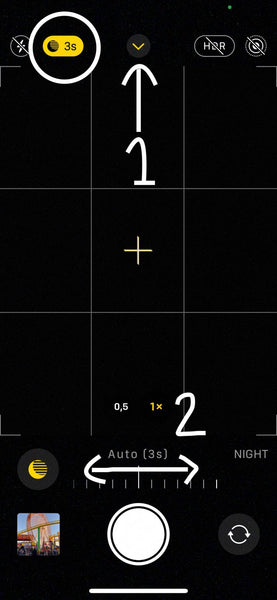
4. Before you take the photo, you can also adjust the focus and exposure by tapping on the screen where you want to focus. You'll see a yellow square appear, this is the focus point. If you swipe up or down on the screen, you can adjust the exposure.

5. Once you're happy with your settings, press the shutter button to take the photo. It's important to keep your iPhone as still as possible while the photo is being taken.
6. After the photo is taken, head to your Photos app and choose your photo. In the top left you'll see this drop down option. Tap Long Exposure to get the effect, and you're all done!

Long exposure photography is a great way to add a sense of motion and drama to your iPhone photos. Whether you're shooting a waterfall, a cityscape, or a busy street, a long exposure can help to create a sense of movement and flow. If you're looking to take your iPhone photography to the next level, give long exposure a try!